
On this page 31 sections
- Why Does a Real Estate Business Need a Professional Website?
- 12 Essential Real Estate Website Features
- 1. Advanced Property Search and Filters
- 2. Detailed Property Listing Pages
- 3. High-Quality Property Images and Video Tours
- 4. Google Maps and Property Location Integration
- 5. WhatsApp Integration and Quick Contact Options
- 6. CRM Integration for Lead Management
- 7. Property Comparison Feature
- 8. User Registration and Saved Properties
- 9. Mobile-Friendly and Responsive Website Design
- 10. SEO-Friendly Website Structure
- 11. Property Management Dashboard
- 12. Website Security and Performance Optimization
- Must-Have vs Advanced Real Estate Website Features
- What Type of Real Estate Website Should You Build?
- How Much Does Real Estate Website Development Cost?
- How to Choose the Right Real Estate Website Development Company
- How Sizaria Technologies Can Help Build Your Real Estate Website
- Frequently Asked Questions (FAQs)
- 1. What are the most important real estate website features?
- 2. How much does it cost to develop a real estate website?
- 3. Can I manage property listings myself?
- 4. Is WordPress suitable for a real estate website?
- 5. Why is mobile-friendly design important for property websites?
- 6. Should a real estate website have WhatsApp integration?
- 7. Can I integrate a CRM into my real estate website?
- 8. How can I get more visitors to my real estate website?
- 9. What is the difference between a real estate website and a property portal?
- 10. How long does it take to develop a real estate website?
- Final Thoughts
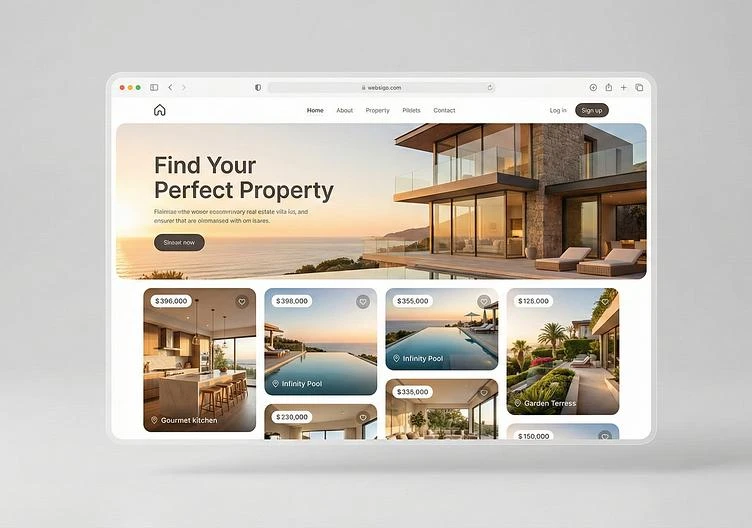
The real estate industry has become increasingly digital. Today, buyers and investors often search online before contacting a property dealer, visiting a property, or making an investment decision. This makes a professional website an essential tool for every real estate business.
However, simply having a website is not enough. A successful real estate website should make it easy for visitors to explore properties, compare prices, contact agents, and find relevant information.
Whether you run a real estate agency, property dealership, construction company, or property development business, investing in the right real estate website features can help you attract potential buyers and generate more qualified leads.
In this guide, we will explore the most important features every real estate business website should have, including property listings, advanced search filters, CRM integration, WhatsApp communication, mobile-friendly design, and SEO.
Why Does a Real Estate Business Need a Professional Website?
A professional website gives your real estate business an online presence where potential customers can explore your services and available properties.
Unlike social media profiles, your website allows you to organize property information, create dedicated landing pages, collect customer inquiries, and build your brand identity.
Here are some important benefits:
- Generate property leads: Collect inquiries from buyers, sellers, and investors.
- Showcase properties: Display residential and commercial properties with images, prices, and details.
- Build customer trust: Present your company information, testimonials, projects, and contact details.
- Improve online visibility: Reach people searching for properties and real estate services on Google.
- Save time: Allow visitors to find property information without contacting your agents for every detail.
- Support business growth: Promote your services to customers in different cities and countries.
A well-planned website can become an important part of your real estate marketing strategy.
12 Essential Real Estate Website Features
A successful real estate website combines attractive design, useful functionality, and a smooth user experience. Below are 12 essential features to consider during property website development.
1. Advanced Property Search and Filters
Property search functionality is one of the most important features of a real estate website.
Visitors should be able to find properties according to their requirements instead of browsing hundreds of unrelated listings.
Your website should include filters such as:
- Property location and city
- Residential or commercial property
- Buy, sell, or rent
- Minimum and maximum price
- Number of bedrooms and bathrooms
- Property size and covered area
- Property type, such as apartment, house, plot, or office
- Furnished or unfurnished status
For example, someone looking for a 5 Marla house in DHA Lahore should be able to apply location, size, and price filters to find relevant properties.
Why it matters: Advanced filters improve navigation, reduce unnecessary searches, and help potential buyers find suitable properties faster.
2. Detailed Property Listing Pages
Every property should have its own dedicated listing page with complete information.
A property listing page should include:
- Property title and description
- High-quality property photographs
- Asking price
- Location and address
- Property size
- Bedrooms and bathrooms
- Available facilities
- Property status
- Agent contact information
- Inquiry or booking form
You can also add property reference numbers to make it easier for agents and customers to identify specific listings.
A well-designed property detail page helps visitors understand what a property offers before contacting your sales team.
3. High-Quality Property Images and Video Tours
Real estate customers want to see a property before arranging a physical visit.
Your website should support high-resolution property photographs, image galleries, video walkthroughs, and virtual tours.
Useful media features include:
- Multiple property images
- Full-screen image galleries
- Video property tours
- 360-degree virtual tours
- Floor plans and layout images
- Before-and-after project photographs
For luxury properties and commercial developments, interactive virtual tours can provide an additional way to explore properties remotely.
Pro tip: Compress images without sacrificing visual quality. This helps maintain website performance while showcasing properties professionally.
4. Google Maps and Property Location Integration
Location plays an important role in real estate decisions.
Integrating Google Maps into your property website allows customers to understand where a property is located and explore nearby areas.
Consider including:
- Interactive Google Maps
- Property location markers
- Nearby schools and universities
- Hospitals and healthcare facilities
- Shopping centres and markets
- Public transport and main roads
- Nearby commercial areas
For example, a property listing in Bahria Town Lahore can display its location alongside nearby facilities.
This gives customers a better understanding of the property's surroundings.
5. WhatsApp Integration and Quick Contact Options
WhatsApp is widely used for business communication, particularly in Pakistan.
Adding WhatsApp integration to your real estate website makes it easier for visitors to contact agents directly.
Useful contact options include:
- WhatsApp inquiry buttons
- Click-to-call functionality
- Contact forms
- Agent-specific contact details
- Email inquiry options
- Appointment booking forms
You can also configure WhatsApp buttons to include the property name or reference number automatically.
For example, when someone clicks the WhatsApp button on a property page, the pre-filled message could be:
"I'm interested in your 10 Marla house in DHA Lahore. Please share more details."
This makes inquiries more relevant and easier for your sales team to manage.
6. CRM Integration for Lead Management
A real estate website can receive inquiries from multiple properties and marketing campaigns. Managing these inquiries manually can become difficult as your business grows.
A Customer Relationship Management (CRM) system helps organize and track potential customers.
A CRM-integrated property website can support:
- Automatic lead collection
- Customer contact records
- Lead assignment to agents
- Inquiry status tracking
- Follow-up reminders
- Sales pipeline management
- Customer communication history
For example, when a visitor submits an inquiry about a commercial property, their information can automatically enter your CRM system.
This reduces manual work and helps agents follow up with potential customers.
7. Property Comparison Feature
Customers often explore multiple properties before making a decision.
A property comparison feature allows visitors to compare different listings side by side.
You can include the following comparison details:
| Property Details | Property A | Property B |
|---|---|---|
| Property Type | House | Apartment |
| Location | DHA Lahore | Bahria Town |
| Size | 10 Marla | 2,000 Sq. Ft. |
| Bedrooms | 5 | 3 |
| Bathrooms | 5 | 3 |
| Price | PKR 4 Crore | PKR 2.5 Crore |
| Parking | Available | Available |
| Property Status | Available | Available |
Note: These are illustrative examples, not actual property listings.
This feature helps buyers compare important details and shortlist properties according to their budgets and requirements.
8. User Registration and Saved Properties
If your real estate business manages a large property inventory, consider adding user accounts.
Visitors can register to save properties and manage their preferences.
Useful account features include:
- User registration and login
- Saved or favourite properties
- Recently viewed listings
- Saved property searches
- Inquiry history
- Email notifications for new listings
For example, a customer searching for apartments in Lahore can save their favourite listings and revisit them later.
This encourages visitors to return to your website.
9. Mobile-Friendly and Responsive Website Design
Many customers browse property websites using smartphones.
Your website should provide a consistent experience across mobile phones, tablets, laptops, and desktop computers.
Important responsive design elements include:
- Mobile-friendly navigation
- Readable property descriptions
- Touch-friendly buttons
- Responsive image galleries
- Easy-to-use search filters
- Fast-loading pages
- Accessible inquiry forms
Google uses the mobile version of website content for indexing and ranking through mobile-first indexing.
Therefore, mobile-friendly real estate web design should be a priority from the beginning.
10. SEO-Friendly Website Structure
A beautiful website will not automatically attract visitors from Google.
Your real estate website needs a proper SEO structure to help search engines discover and understand its pages.
Important SEO features include:
- SEO-friendly URLs
- Optimized title tags and meta descriptions
- Proper heading structure
- Image alt text
- XML sitemap
- Robots.txt configuration
- Canonical URLs
- Internal linking
- Local business information
- Relevant structured data
You should also create dedicated pages for different locations and property categories where they provide genuinely useful, unique information.
For example:
- Houses for Sale in DHA Lahore
- Apartments for Rent in Gulberg Lahore
- Commercial Properties in Islamabad
- Residential Plots in Bahria Town
For better search visibility, consider professional SEO services in Lahore.
11. Property Management Dashboard
Managing property listings manually can become challenging when your business has hundreds of properties.
An admin dashboard allows your team to manage website content without requiring technical knowledge.
A useful property management dashboard should support:
- Add, edit, and delete properties
- Upload property photographs
- Update property prices
- Manage property categories
- Change property availability
- Manage agents and users
- Review customer inquiries
- Feature selected properties on the homepage
This makes daily website management easier and more efficient.
12. Website Security and Performance Optimization
Security and website speed are essential for every professional real estate business.
A slow website can frustrate visitors, while poor security can put customer information at risk.
Important technical features include:
- SSL certificate and HTTPS
- Secure login and authentication
- Regular website backups
- Spam protection
- Secure contact forms
- Image compression
- Browser caching
- Database optimization
- Performance monitoring
You should also monitor Core Web Vitals to understand how quickly your website loads and responds to visitors.
A fast, secure website provides a better experience and supports your overall SEO strategy.
Must-Have vs Advanced Real Estate Website Features
Not every real estate business needs every feature from day one. The right functionality depends on your business size, property inventory, and customer requirements.
The following table compares essential features with more advanced options.
| Feature | Essential Website | Advanced Website |
|---|---|---|
| Property listings | Yes | Yes |
| Property search | Basic filters | Advanced filters |
| Property images | Image gallery | 360° virtual tours |
| Contact options | Contact form | WhatsApp and CRM |
| Google Maps | Location map | Interactive location search |
| Property comparison | Optional | Yes |
| User accounts | Optional | Yes |
| Property dashboard | Basic admin panel | Advanced management |
| SEO | Basic on-page SEO | Technical and local SEO |
| Analytics | Basic tracking | Advanced conversion tracking |
Recommendation: Start with the essential features and gradually introduce advanced functionality as your property business grows.
What Type of Real Estate Website Should You Build?
Before starting property website development, identify the type of website that matches your business model.
| Website Type | Main Purpose | Recommended Features |
|---|---|---|
| Real Estate Agency Website | Promote agency services | Property listings, agent profiles, inquiry forms |
| Property Dealer Website | Buy, sell, and rent properties | Search filters, WhatsApp, property galleries |
| Property Portal | Display multiple property listings | Advanced search, user accounts, property comparison |
| Real Estate Developer Website | Showcase development projects | Project galleries, floor plans, location maps |
| Commercial Real Estate Website | Promote offices and commercial spaces | Commercial filters, detailed specifications, lead forms |
| Rental Property Website | Promote rental listings | Availability, rental filters, inquiry forms |
Choosing the correct website structure helps avoid unnecessary development costs and ensures your website supports your business goals.
How Much Does Real Estate Website Development Cost?
The cost of developing a real estate website depends on its design, functionality, technology, and overall complexity.
A simple property website with basic listings will generally require less development work than a custom property portal with advanced search, CRM integration, user accounts, and automated listing management.
Here is a general comparison of development scope:
| Development Level | Included Features | Complexity |
|---|---|---|
| Basic | Responsive design, property listings, contact forms | Low |
| Professional | Advanced filters, maps, galleries, SEO | Medium |
| Advanced | CRM, user accounts, comparison, custom dashboard | High |
| Enterprise | Custom integrations, automation, scalable property portal | Very High |
Actual pricing should be determined after reviewing the required features, design expectations, integrations, and project scope.
How to Choose the Right Real Estate Website Development Company
Choosing the right development partner is important because your website will represent your business online.
Before hiring a website development company, consider these factors:
- Portfolio: Review previous website design and development projects.
- Custom development: Make sure the company can develop features according to your business requirements.
- Mobile responsiveness: Check how websites perform on smartphones and tablets.
- SEO knowledge: Choose a team that understands technical SEO and search-friendly website structures.
- Website security: Ask about SSL, backups, authentication, and security practices.
- Maintenance: Confirm whether ongoing updates and technical support are available.
- Scalability: Make sure the website can support additional listings and functionality as your business grows.
A reliable development partner should understand both your technical requirements and your business objectives.
How Sizaria Technologies Can Help Build Your Real Estate Website
At Sizaria Technologies, we provide professional website design and development solutions for businesses looking to establish a strong digital presence.
We understand that a real estate website needs more than attractive visuals. It requires practical functionality that helps businesses showcase properties, manage inquiries, and connect with potential customers.
Our web design and development services can include:
- Custom real estate website design
- Responsive website development
- Property listing management
- Advanced property search and filters
- WhatsApp and contact form integration
- Google Maps integration
- CRM integration
- SEO-friendly website structure
- Website speed optimization
- Secure website development
Whether you need a property dealer website, a real estate agency website, or a custom property portal, our team can help plan a solution according to your requirements.
Explore our Web Design and Development services in Lahore to learn more.
You can also explore our complete range of services and digital marketing solutions to support your business growth.
Frequently Asked Questions (FAQs)
1. What are the most important real estate website features?
The most important features include property listings, advanced search filters, high-quality images, Google Maps integration, WhatsApp contact buttons, inquiry forms, mobile responsiveness, and SEO optimization.
2. How much does it cost to develop a real estate website?
The cost depends on the website's design, functionality, number of property listings, and integrations. A basic property website costs less than an advanced portal with CRM, user accounts, and automated property management.
3. Can I manage property listings myself?
Yes. A real estate website can include an admin dashboard that allows you to add, edit, remove, and update property listings without requiring coding knowledge.
4. Is WordPress suitable for a real estate website?
Yes. WordPress can be suitable for real estate agencies and property businesses, particularly when combined with appropriate property listing plugins and custom functionality. Larger platforms may benefit from custom development depending on their requirements.
5. Why is mobile-friendly design important for property websites?
Mobile-friendly design makes it easier for customers to browse listings, view property images, apply search filters, and contact agents from their smartphones. It also supports Google's mobile-first indexing.
6. Should a real estate website have WhatsApp integration?
Yes. WhatsApp integration provides a convenient communication channel for potential buyers and sellers, particularly in markets where WhatsApp is widely used for business communication.
7. Can I integrate a CRM into my real estate website?
Yes. A CRM can collect website inquiries, organize customer information, assign leads to agents, and track follow-ups. The integration depends on the CRM platform and website technology.
8. How can I get more visitors to my real estate website?
You can attract visitors through SEO, location-specific property pages, helpful blog content, Google Business Profile optimization, social media marketing, and paid advertising. Consistent optimization and useful content can help build organic visibility over time.
9. What is the difference between a real estate website and a property portal?
A real estate website generally promotes an individual agency, dealer, or developer. A property portal is designed to display listings from multiple agents, owners, or businesses and usually requires more advanced search and listing management functionality.
10. How long does it take to develop a real estate website?
The development timeline depends on the project scope. A basic website can take less time than a custom property portal with advanced integrations, automated features, and extensive property management functionality.
Final Thoughts
A professional real estate website can help your business build trust, showcase properties, attract potential buyers, and manage customer inquiries more effectively.
From advanced property search and WhatsApp integration to CRM functionality and SEO optimization, every feature should serve a clear business purpose.
The best approach is to build a website around your customers' needs and expand its functionality as your business grows.
Ready to build a professional real estate website?
Contact Sizaria Technologies to discuss your website design and development requirements and create a digital platform that supports your business goals.














Leave a comment